You publish a useful post on your WordPress learning site, check it the next day, and it's already buried under newer entries. That's the moment most beginners realize that “writing a post” and building lasting traffic are two different jobs. A good evergreen content strategy turns that one helpful article into something that keeps earning attention long after the publish date, much like a durable guide that gets revisited instead of forgotten.
The shift is simple but important. News-style posts chase a moment, while evergreen posts keep answering the same recurring question for months or years. In publishing, evergreen material is often treated as a traffic engine because it can keep drawing readers long after publication, and a frequently cited benchmark says it can account for up to 40% of publisher traffic (publishing benchmark discussion). On a small learning blog, that means your best pages are usually the ones that solve stable problems clearly and can be maintained without a big team.
If you're already using a simple WordPress setup, this approach fits naturally. It rewards a plain site, a focused topic, and a habit of updating what still matters. A useful reference point for agencies is the glossary explanation of evergreen content for agencies, which makes the same basic idea easy to recognize in a broader marketing context.
Table of Contents
- Introduction to Evergreen Content Strategy
- Core Principles of Evergreen Content
- Choosing Stable Topics and Pillar Pages
- Setting the 80/20 Content Mix and Refresh Cycle
- Maintaining Posts with Block-Based Updates
- Evergreen Examples on a WordPress Learning Site
- Building Durable Frameworks for AI Search
Introduction to Evergreen Content Strategy
A beginner-friendly WordPress site usually starts the same way. You post a welcome note, maybe a short tutorial, and then the front page changes so fast that the helpful article feels hidden almost immediately. That's frustrating, especially when the post took real effort and answers a question people keep asking.
The fix isn't publishing more random posts. It's building a library where some pages are meant to last, so the site doesn't depend on the newest article for all of its traffic. That's the core of an evergreen content strategy, and it works best when you think less like a one-time publisher and more like a librarian who keeps the important shelves in order.
Practical rule: If a post still helps a new reader six months from now, it belongs in your evergreen plan.
On a small site, that mindset matters because you won't have endless pages competing for attention. A durable explainer about a recurring question can keep paying off while shorter trend posts fade out. Over time, that's what makes the site feel useful instead of busy.
The strategy also changes how you treat old posts. Instead of assuming they're finished once they're published, you start checking whether they still match search intent, whether they need fresh examples, and whether they deserve a better internal link from a newer page. That maintenance habit is what separates a stable learning site from a pile of dated articles.
Core Principles of Evergreen Content
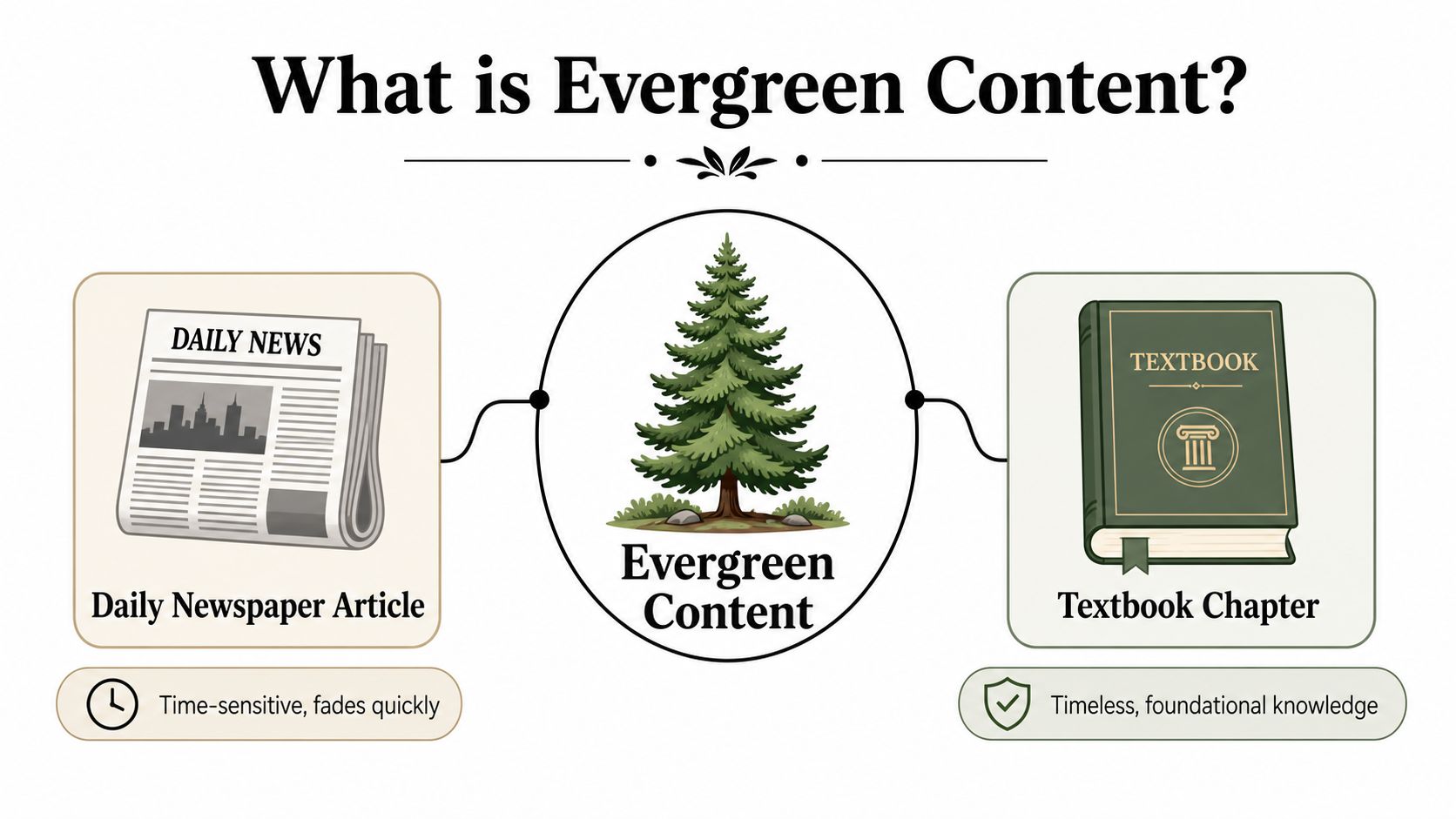
Evergreen content is easiest to understand if you compare it to a textbook chapter. A newspaper story is built around a moment, so it loses value quickly when the moment passes. A textbook chapter explains a foundational idea, and that makes it useful for a long time.
What makes a page evergreen
The first requirement is stable search demand. The topic should answer a question people keep asking, not one tied to a short-lived event or a temporary trend. If the page only makes sense this week, it's probably not evergreen.
The second requirement is timeless usefulness. That doesn't mean “never changes.” It means the core explanation still works even when examples, screenshots, or supporting details need updating later. A page about how to structure a beginner tutorial can stay useful even if the software interface shifts.
The third requirement is linkability. Evergreen pages are often the ones other pages want to point to because they cover a subject clearly and broadly. That's why they can act like anchors in a site's content library, not just isolated posts.
Why this matters for a small site
A small publisher doesn't need every post to be evergreen, but the durable pages often do the heavy lifting. They build topical memory in the site, and they give readers a place to start when they're new. In practice, this is why educational and learning sites often treat foundational explainers as core assets rather than disposable posts.
Evergreen content also supports a stronger reading experience because it reduces confusion. A reader lands on the page, sees a clear explanation, and doesn't have to wonder whether the advice expired last week. That's a quiet advantage, but it's a real one.
The best way to think about it is this, evergreen content is not “content that never ages.” It's content that stays worth returning to because it solves a lasting problem in a clear, accessible way.
Choosing Stable Topics and Pillar Pages
A small learning blog often loses steam because the topic choice starts with enthusiasm instead of durability. A post can feel useful on draft day and still fade quickly if it only answers a one-time curiosity. A better filter starts with the reader's repeated question, then checks whether that question stays relevant after the first burst of attention passes.
How to judge a topic before you write
A strong evergreen topic usually solves a recurring problem, not a news update. It should match the format the searcher expects, because intent and packaging have to line up. If someone wants a beginner explanation, a long opinion piece may miss the mark even if the writing is good.
A practical filter helps here:
- Recurring problem: The question shows up again and again for beginners or learners.
- Stable intent: The searcher wants an explanation, guide, or definition, not breaking news.
- Pillar potential: The topic can support several related subtopics without becoming vague.
That last point matters on a learning blog. A pillar page functions like a textbook chapter heading, introducing the subject and pointing to more detailed sections. Cluster posts fill in the narrower parts, such as examples, definitions, or walkthroughs. Internal links connect the pieces, so the site starts to feel organized instead of scattered.
Pillar pages work like chapter headings
A pillar page functions like the chapter heading in a textbook. It sets out the subject, explains the core ideas, and points readers toward the smaller sections that go deeper. Cluster posts sit under that main guide, with each one answering a narrower question.
This structure helps search engines and readers at the same time. Readers can move from the broad guide to a more specific post without getting lost. Search systems can also see that the site covers one subject thoroughly instead of mentioning it once and moving on.
Helpful habit: Keep the canonical URL stable when you refresh a pillar page, so the page keeps its accumulated links and history.
That stability matters on a minimal self-hosted WordPress site. You do not need a large category tree or complicated navigation. A few reliable cornerstone pages can teach the basics well, and a small set of supporting posts can point back to them naturally.
Setting the 80/20 Content Mix and Refresh Cycle
A small WordPress site is easier to keep healthy when you decide ahead of time how much of it should stay steady and how much should respond to current interest. A practical starting point is an 80/20 mix, with 80% evergreen and 20% trending content. That gives the site a solid core without making every page chase the latest topic.
The mix is an editorial choice, not a math trick
The ratio works because it sets a clear job for each type of post. Evergreen articles give the site long-term structure, while timely articles can catch bursts of interest, seasonal searches, or a current conversation. If every post is tied to the moment, the site becomes fragile. If every post tries to last forever, the site can miss short-lived opportunities and start to feel flat.
For a beginner running a small learning blog, the easiest way to use the mix is to protect your main effort for foundation posts. Then set aside a smaller share of your publishing time for posts that are timely, experimental, or tied to a specific event in WordPress, such as a new block feature or a change in a common plugin. The site then grows in a deliberate shape instead of drifting toward whatever seems urgent that week.
A useful mental model is a bookshelf. The evergreen posts are the books you keep on the shelf because readers will return to them, while the trending posts are the short notes you pin nearby because they matter now. Both have a place, but they should not carry the same weight.
Refreshes should be scheduled, not guessed
The refresh cycle is the other half of the system. Practitioner guidance commonly recommends reviewing evergreen posts every 6 months and again at 12 months, or at least every 12–18 months, to replace outdated statistics, fix broken links, and restore performance when needed (refresh cadence guidance). Another source recommends structured reviews around quarterly or 6- to 12-month intervals for important pages (practitioner guidance on content mix and review cycles).
That does not mean every post needs the same level of attention. A tutorial that brings in readers every week deserves a closer look than a quiet background page that supports the site in a smaller way. The useful habit is to set a recurring audit reminder, so the site owner checks posts before they become obviously stale instead of waiting for a drop in trust or visibility.
| Review signal | What it usually means |
|---|---|
| Outdated examples | The page needs a fresh illustration or walkthrough |
| Broken links | The page needs a cleanup pass |
| Declining visibility | The page may need a title, intent, or structure review |
The important mindset shift is straightforward. Evergreen content is not a statue. It is a working asset that needs light upkeep, the same way a small garden needs regular weeding even if the layout stays the same.
Maintaining Posts with Block-Based Updates
Once a post is on the site, the goal isn't to rewrite it every time something changes. The better approach is to update only the parts that have gone stale. In WordPress block editing, that usually means working section by section, so you can improve the article without destroying what already performs well.
Update the parts that actually decay
Most evergreen decay comes from a few predictable problems: old statistics, broken links, outdated screenshots, and examples that no longer match the current interface. Those are usually small fixes, but they matter because they affect trust. A reader notices quickly when a guide feels abandoned.
A clean update workflow looks like this:
- Refresh the evidence by replacing stale statistics or dated examples.
- Check links so outbound references still work.
- Update screenshots if the interface has changed.
- Revise FAQs when reader questions have shifted.
- Improve internal links so the post connects to newer related pages.
That approach is faster than rewriting the entire article, and it preserves the useful parts that are still doing their job. It also helps you avoid creating accidental changes that weaken the post's structure.
Keep the page honest and easy to reindex
A visible Last Updated label is useful because it tells the reader the page has been maintained. If you make a major update, republishing the update date in your CMS front matter can help search systems recognize the change more quickly. Submitting the URL for reindexing after a significant refresh is also a sensible habit because it encourages crawlers to process the page again sooner.
A refreshed article should look cared for, not simply older with a new date pasted on top.
The URL should stay stable unless the page itself is changing purpose. That keeps backlinks, bookmarks, and accumulated authority intact. For a beginner, that's one of the easiest ways to protect the work you've already done while still keeping the post current.
Evergreen Examples on a WordPress Learning Site
A small WordPress learning site is one of the easiest places to practice evergreen content, because the whole system is easier to inspect. There are fewer templates, fewer plugins, and fewer moving parts, so you can see what helps a post stay useful. A beginner guide about a question people ask again and again can sit beside a static page and a short starter post without needing a large content library to support it.
The simple layout matters here. A clean reading view, a clear blog link, and comment support give readers a direct path back to the site, which is helpful when you want older posts to keep working instead of fading out after publication. For a one-person learning site, that kind of structure is like keeping the shelves in a small classroom labeled, so students can find the same book again without searching through piles.
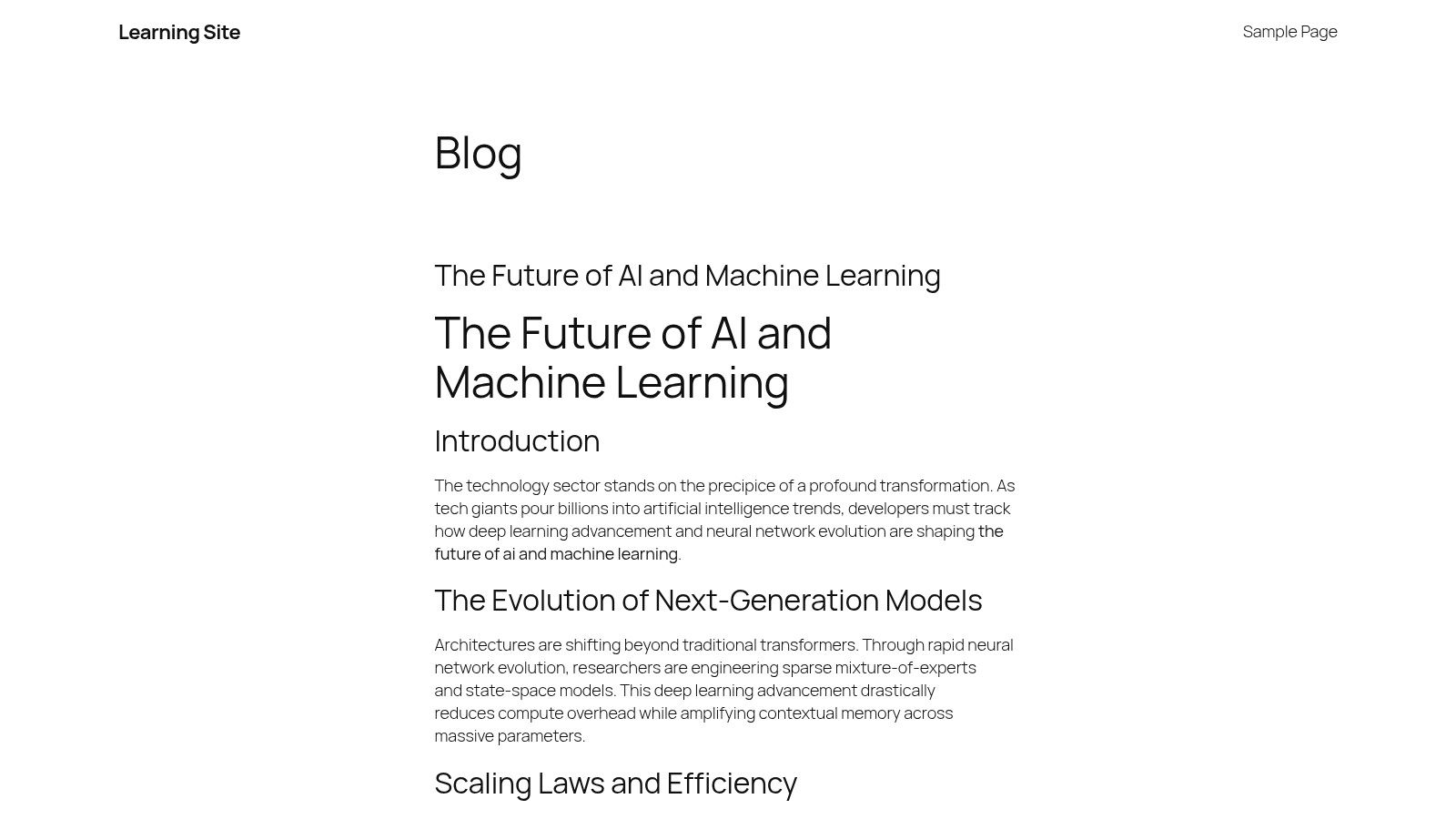
The screenshot shows the kind of simple WordPress setup that fits evergreen work well. A site like this does not need fancy motion or a crowded homepage to prove a point. It needs a page structure that keeps one stable guide easy to read, easy to return to, and easy to update when the topic shifts or the interface changes.
A useful example is a post that explains one beginner workflow in plain steps, then points to a few narrower follow-up posts. The main article stays broad and steady, like the hallway map in a library, while the smaller posts handle the more specific questions that can change later. That keeps the central guide readable and gives the site a natural topic cluster without forcing every page to do the same job.
The feed layer also helps. RSS lets readers subscribe without checking the site manually, which suits students and self-learners who return when new material appears. If the evergreen post is written clearly and maintained with care, it can keep serving both search traffic and returning readers without needing a redesign or a new publishing system.
For a site that stays small on purpose, maintenance thresholds matter more than volume. A post only needs enough freshness to remain accurate, a clear route for readers to follow, and a structure that search systems can still understand when the topic is scanned by AI tools. If a guide is still useful, still easy to read, and still connected to the rest of the site, it can keep its place without becoming a full rebuild project.
The video embed fits here as a visual example of how a small site can support an evergreen lesson without adding clutter. On a learning blog, a short embedded walkthrough can show how a stable topic still benefits from a clear structure, while the written post carries the main explanation and the practical maintenance advice. It works best as a support piece, not as the main content, so the article remains the part readers rely on when they need to revisit the idea later.
Building Durable Frameworks for AI Search
AI search changes the bar for what counts as useful. A page that only repeats a generic definition is easier for answer systems to summarize than to reward with a click. That's why modern evergreen strategy needs more than stable keywords. It needs durable frameworks that give the reader enough context to keep going.
Frameworks survive better than thin explanations
A durable page doesn't just answer one question. It covers the follow-up questions a beginner will ask next, the common misunderstandings they're likely to hit, and the practical trade-offs they need to make. That kind of structure gives the article a shape that's harder to replace with a short AI summary.
The older idea of “evergreen” gets a useful upgrade. Instead of thinking only about timeless answers, think about timeless problem-solving. A page built around how to choose, maintain, compare, or update something is often more durable than a page built around a narrow definition alone.
That doesn't mean you should stuff every article with extra sections. It means the article should be complete enough to stand on its own. If a reader leaves with the main answer plus the next steps, the page has done real work.
AI visibility depends on usefulness, not just longevity
AI search rewards content that is clearly structured, context-rich, and easy to understand. If you want a practical way to check that quality, a tool like Improve your website's AI Visibility can help you think about how your content may be interpreted in answer-driven search environments. The point isn't to chase every new interface. It's to make sure your pages still help people when search results themselves become more conversational and compressed.
The long-term lesson is simple. Evergreen content isn't “set and forget,” and it isn't just “rank once, rank forever.” It's a commitment to maintaining pages that stay useful as search behavior, reader expectations, and content formats keep changing.
Learning Site is a clean place to practice this kind of publishing because its simple WordPress structure makes durable content easier to manage. If you want a small, readable environment for testing evergreen posts, RSS habits, and low-maintenance updates, visit Learning Site and see how a lightweight learning blog can support that workflow.
Created with Outrank app
Leave a Reply